If you would like to detect Japanese Character Encoding like SJIS or EUC-JP.
I heavy recommended you juniversalchardet
http://java.akjava.com/library/juniversalchardet
This opensource project come from some mozilla projects.
this utility is really easy to use.
my DetectUtils.java sample code will help you.
Tuesday, February 16, 2010

forwardingmultiset sample code
I make some forwardingmultiset sample code.
this page written in Japanese,but maybe Google site system 'll translate automatically if you click right bottom button.
http://java.akjava.com/library/google-collections/forwardingmultiset
multiset is very useful something count.
if you need more functions on that,you can use ForwardingMultiset.
I add new Functions just count,keep maxvalue and keep minvalue.
this page written in Japanese,but maybe Google site system 'll translate automatically if you click right bottom button.
http://java.akjava.com/library/google-collections/forwardingmultiset
multiset is very useful something count.
if you need more functions on that,you can use ForwardingMultiset.
I add new Functions just count,keep maxvalue and keep minvalue.
Thursday, January 31, 2008
mkhuman's .obj and jme
i'm afraid this is already have been solved.
but i had coudn'd ,that why i'm writing.
so when i read .obj which made by makehuman.
i need head's TriMesh,but 'node.getChild("head")' didnt work.
so i changed ObjToJme.class keep line usemtl's name.
I'm not sure this patch work or not,but it easy to explain what i changed.
### Eclipse Workspace Patch 1.0
#P jMonkeyEngine
Index: src/com/jmex/model/converters/ObjToJme.java
===================================================================
RCS file: /cvs/jme/src/com/jmex/model/converters/ObjToJme.java,v
retrieving revision 1.2
diff -u -r1.2 ObjToJme.java
--- src/com/jmex/model/converters/ObjToJme.java 21 Sep 2007 15:45:30 -0000 1.2
+++ src/com/jmex/model/converters/ObjToJme.java 1 Feb 2008 06:57:08 -0000
@@ -283,8 +283,13 @@
addMaterial(parts);
return;
} else if ("usemtl".equals(parts[0])) {
- if (materialNames.get(parts[1]) != null)
+
+ if (materialNames.get(parts[1]) != null){
+ //TODO
curGroup = materialNames.get(parts[1]);
+ //something special for makehuman
+ curGroup.name=parts[1];
+ }
else
setDefaultGroup();
return;
@@ -395,6 +400,14 @@
ArraySet thisMat = materialSets.get(curGroup);
if (thisMat.objName == null && curObjectName != null)
thisMat.objName = curObjectName;
+ //TODO
+ //something special for makehuman .obj file
+ if(thisMat.objName.equals("mesh.obj") && curGroup.name!=null){
+ thisMat.objName=curGroup.name;
+ }
+
+
+
IndexSet first = new IndexSet(parts[1]);
int firstIndex = thisMat.findSet(first);
IndexSet second = new IndexSet(parts[2]);
@@ -482,6 +495,8 @@
MaterialState m;
TextureState ts;
AlphaState as;
+ //TODO
+ String name;
}
/**
but i had coudn'd ,that why i'm writing.
so when i read .obj which made by makehuman.
i need head's TriMesh,but 'node.getChild("head")' didnt work.
so i changed ObjToJme.class keep line usemtl's name.
I'm not sure this patch work or not,but it easy to explain what i changed.
### Eclipse Workspace Patch 1.0
#P jMonkeyEngine
Index: src/com/jmex/model/converters/ObjToJme.java
===================================================================
RCS file: /cvs/jme/src/com/jmex/model/converters/ObjToJme.java,v
retrieving revision 1.2
diff -u -r1.2 ObjToJme.java
--- src/com/jmex/model/converters/ObjToJme.java 21 Sep 2007 15:45:30 -0000 1.2
+++ src/com/jmex/model/converters/ObjToJme.java 1 Feb 2008 06:57:08 -0000
@@ -283,8 +283,13 @@
addMaterial(parts);
return;
} else if ("usemtl".equals(parts[0])) {
- if (materialNames.get(parts[1]) != null)
+
+ if (materialNames.get(parts[1]) != null){
+ //TODO
curGroup = materialNames.get(parts[1]);
+ //something special for makehuman
+ curGroup.name=parts[1];
+ }
else
setDefaultGroup();
return;
@@ -395,6 +400,14 @@
ArraySet thisMat = materialSets.get(curGroup);
if (thisMat.objName == null && curObjectName != null)
thisMat.objName = curObjectName;
+ //TODO
+ //something special for makehuman .obj file
+ if(thisMat.objName.equals("mesh.obj") && curGroup.name!=null){
+ thisMat.objName=curGroup.name;
+ }
+
+
+
IndexSet first = new IndexSet(parts[1]);
int firstIndex = thisMat.findSet(first);
IndexSet second = new IndexSet(parts[2]);
@@ -482,6 +495,8 @@
MaterialState m;
TextureState ts;
AlphaState as;
+ //TODO
+ String name;
}
/**
Saturday, May 20, 2006
How to use Scrollbar in SWT
I was shocked because I have forgot How to scroll Text.
It's so simple.
Text text = new Text(panel,SWT.MULTI|SWT.V_SCROLL|SWT.H_SCROLL);
It's so simple.
Text text = new Text(panel,SWT.MULTI|SWT.V_SCROLL|SWT.H_SCROLL);
Thursday, August 18, 2005
What is Insets?[GEF/Draw2D]

How many pixels inset a figure by a border on top,bottom,left and right.
Some layouts take care that value.
And I guess it help to know if a border was clicked.
Anyway,generally a border overdraw a figure in insets.
Maybe you could know if events happen inside a border like below.
public class MouseClicked extends MouseListener.Stub{
public void mousePressed(MouseEvent me) {
Figure figure=(Figure)me.getSource();
//I guess there are other better way.
if(figure.getBounds().contains(me.x,me.y) && !figure.getBounds().getCropped(figure.getInsets()).contains(me.x,me.y)){
shell.setText("click border");
}else{
shell.setText("click inside");
}
}
}
Thursday, August 11, 2005
like WaveFormGraph and zoom in and zoom out and stretch[GEF/Draw2D]
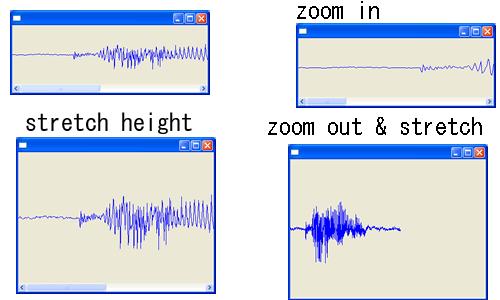
Of course my way is tricky.
But I don't know how to set different scale both width and height.
please see code anyway,it's difficult to explain how to do that.
In my program,I use ScaledPane and ToolbarLayout.
So It's easy zoom in and zoom out.
but When I wish fix height,I would do something.
In my code,I change my graph figure return 1x1 dimension everytime.
because on scaled changed,height length would be changed.
public Dimension getPreferredSize(int hintW,int hintH){
System.out.println(getParentScale());
if(horizontal){
//return new Dimension(values.length*space,maxValue-minValue);
//return new Dimension(values.length*space,(int)((maxValue-minValue)/getParentScale()));
return new Dimension(values.length*space,1);
}else{
return new Dimension(hintW,hintH);
}
}
Once you do that,it's ToolbarLayout and height would be stretched automatic.
Codes
ScaledToolbarLayoutTest.java
ScaledWavFormGraphTest.java
Tuesday, August 09, 2005
my Ecliipse RCP Application for Windows -akJ OptipngWrapper

There are Optimizing PNG File Application - Optipng
And This is Optipng Wrapper Application.
In this application I didn't use draw2d yet.
It's simple Eclipse RCP Application.
It may work under Windows Platform.
If there were not .exe file.No one use this application.
I don't know how to support other platform.
And more it include command-line exe.
you can download this application from sourceforge.jp
And this is Opensource Application,
and you can see code cvs.sourceforge.jp
but be carefull,I didn't refactoring yet.
Monday, August 08, 2005
Scroll ScrollPane by MouseWheel [Draw2D]
Create class implement SelectionListener and write that.
public class WheelMove implements SelectionListener{
public void widgetSelected(SelectionEvent arg0) {
ScrollBar bar=scrollpane.getHorizontalScrollBar();
int direction=1;//16777218
if(arg0.detail==16777217){
direction=-1;
}
bar.setValue(bar.getValue()+direction*bar.getStepIncrement());
}
public void widgetDefaultSelected(SelectionEvent arg0) {
}
}
and get Real ScrollBar of FigureCanvas and add a addSelectionListener.
FigureCanvas canvas = new FigureCanvas(shell);
canvas.getVerticalBar().addSelectionListener(new WheelMove());
FullCode
http://cvs.sourceforge.jp/cgi-bin/viewcvs.cgi/akjrcp/draw2dexample/src/example/draw2d/NonOpaqueViewPort.java?rev=HEAD&content-type=text/vnd.viewcvs-markup
public class WheelMove implements SelectionListener{
public void widgetSelected(SelectionEvent arg0) {
ScrollBar bar=scrollpane.getHorizontalScrollBar();
int direction=1;//16777218
if(arg0.detail==16777217){
direction=-1;
}
bar.setValue(bar.getValue()+direction*bar.getStepIncrement());
}
public void widgetDefaultSelected(SelectionEvent arg0) {
}
}
and get Real ScrollBar of FigureCanvas and add a addSelectionListener.
FigureCanvas canvas = new FigureCanvas(shell);
canvas.getVerticalBar().addSelectionListener(new WheelMove());
FullCode
http://cvs.sourceforge.jp/cgi-bin/viewcvs.cgi/akjrcp/draw2dexample/src/example/draw2d/NonOpaqueViewPort.java?rev=HEAD&content-type=text/vnd.viewcvs-markup
Change isOpaque() of ScrollPane [Draw2D]
 Finaly,I upload sample codes to cvs.
see here
http://cvs.sourceforge.jp/cgi-bin/viewcvs.cgi/akjrcp/draw2dexample/src/example/draw2d/
I'm sorry,I don't have any way to know other platform results.
So I guess sometime on non-windows platrom it's didn't work correctly.
isOpaque methods of Scrollpane return always true.
but if you don't like it,overwrite it.
public class NoOpaqueScrollPane extends ScrollPane{
public boolean isOpaque(){
return false;
}
}
FullCode
http://cvs.sourceforge.jp/cgi-bin/viewcvs.cgi/akjrcp/draw2dexample/src/example/draw2d/NonOpaqueViewPort.java?rev=HEAD&content-type=text/vnd.viewcvs-markup
Sunday, August 07, 2005
Customize BorderLayout of Draw2D

If you customized BorderLayout.java ,you could do such things.
Certainly,If you overwrited getPreferedSize(),and you could do.
But If you did customize BorderLayout,You could control center figure of BorderLayout.
It's simple and usefull.
I copy from BorderLayout.java to CustomBorderLayout.java
and new field.
and create both of get and set methods.
private boolean stretchCenterWidth=true;
private boolean stretchCenterHeight=false;
and ,on layout() methods,
I replace code to when stretchCenter* is true,layoutmanager stretch figure width or height.
if(!stretchCenterHeight){
if (childSize.height <>
area.y += (area.height - childSize.height) / 2;
area.height = childSize.height;
}
}
if(!stretchCenterWidth){
if (childSize.width <>
area.x += (area.width - childSize.width) / 2;
area.width = childSize.width;
}
}
finally use call in your program like this.
CustomBorderLayout layout=new CustomBorderLayout(); layout.setStretchCenterWidth(true);
layout.setStretchCenterHeight(true);
FullCode
http://cvs.sourceforge.jp/cgi-bin/viewcvs.cgi/akjrcp/draw2dexample/src/example/draw2d/CustomBorderLayoutTest.java?rev=1.1&content-type=text/vnd.viewcvs-markup
Saturday, August 06, 2005
like transparent figure on Draw2D

In this here,I'd like to explain how to create like transparent figure.
but this way is only create 1x1 sized image which has alpha and draw fill bounds of figure.
So If you add figures insert this figure,it would never be transparent.
Although,If you add one more this way figure as shadow,It would be neat.
I use this tips in my Eclipse RCP Application;akJ Subplayer
-Example
In this example,add two AlphaLayerFigures.
---add first AlphaLayerFigure
On Constracter It send color and alpha(0-255) arugments.
AlphaLayerFigure figure1=new AlphaLayerFigure(ColorConstants.red,128);
figure1.setBounds(new Rectangle(0,0,100,100));
figure1.add(new Label("layer1"));
panel.add(figure1);
---add second AlphaLayerFigure
This code use FlowLayout to layout label to align left.
AlphaLayerFigure figure2=new AlphaLayerFigure(ColorConstants.orange,128);
figure2.setBounds(new Rectangle(5,5,100,100));
FlowLayout layout=new FlowLayout();
layout.setMajorAlignment(FlowLayout.ALIGN_RIGHTBOTTOM);
figure2.setLayoutManager(layout);
figure2.add(new Label("layer2"));
panel.add(figure2);
---AlphaLayerFigure
----Constracter
In Constracter,Palette was Created by a color argument.
And a image sized 1x1 was created by that Palette with alpha value.
public AlphaLayerFigure(Color color,int alpha){
super();
this.color=color;
PaletteData palette=new PaletteData(new RGB[]{color.getRGB()});
imageData = new ImageData(1,1,8,palette);
imageData.alpha=alpha;
imageData.setPixel(0,0,0);
layerImage = new Image(null,imageData);
}
---On Color Changed;setColor()
When color was changed,Image would be create again and paint.
this.color=color;
imageData.palette.colors[0]=color.getRGB();
if(layerImage!=null && !layerImage.isDisposed()){
layerImage.dispose();
}
layerImage=new Image(null,imageData);
repaint();
---On Alpah Changed;setAlpha()
Do same as color changed.
public void setAlpha(int alpha){
imageData.alpha=alpha;
if(layerImage!=null && !layerImage.isDisposed()){
layerImage.dispose();
}
layerImage=new Image(null,imageData);
repaint();
}
FullCode
http://cvs.sourceforge.jp/cgi-bin/viewcvs.cgi/akjrcp/draw2dexample/src/example/draw2d/AlphaTest.java?rev=1.1&content-type=text/vnd.viewcvs-markup
Friday, August 05, 2005
First Draw2D

You need draw2d.jar of GEF and swt.jar to run below program.
At first it's need to create FigureCanvas.
FigureCanvas connect Components and Figures.
Besides that there are LightweightSystem
FigureCanvas canvas = new FigureCanvas(shell);
Next ,it need to create Panel of Draw2D which is one of Figures. And set FlowLayout as Layout. On Draw2D figure is set as tree ,So it's need root Figure. And Method setContens() set root Figure .
Panel panel=new Panel(); panel.setLayoutManager(new FlowLayout(false)); canvas.setContents(panel);
Finally,it add labels of Draw2D. On Draw2D,there are no need to add a parent Figure argument,because it add a children figure to a parent Figure directly.
for(int i=0;i<3;i++){
Label label=new Label("draw2d "+i);
panel.add(label);


---
//all codes.

/*
 * Created on 2005/07/28
 * Author aki@www.xucker.jpn.org
 * License Apache2.0 or Common Public License
 */
package example.draw2d;

import org.eclipse.draw2d.FigureCanvas;
import org.eclipse.draw2d.FlowLayout;
import org.eclipse.draw2d.Label;
import org.eclipse.draw2d.Panel;
import org.eclipse.swt.SWT;
import org.eclipse.swt.layout.FillLayout;
import org.eclipse.swt.widgets.Display;
import org.eclipse.swt.widgets.Shell;

/**
 *
 *
 */
public class Draw2DLabel {


    public Draw2DLabel(Shell shell) {

  shell.setBounds(0,0,150,150);
  shell.setLayout(new FillLayout(SWT.VERTICAL));

  FigureCanvas canvas = new FigureCanvas(shell);
  Panel panel=new Panel();
  panel.setLayoutManager(new FlowLayout(false));
  canvas.setContents(panel);

  for(int i=0;i<3;i++){
  Label label=new Label("draw2d "+i);
  panel.add(label);
  }
    }

 public static void main(String[] args) {
  Display display=new Display();
  Shell shell=new Shell(display);


  Draw2DLabel app=new Draw2DLabel(shell);


  shell.open();

  while(!shell.isDisposed()){
   if (!display.readAndDispatch ()){
     display.sleep ();
      }
  }
  display.dispose();
 }

}
}
Tuesday, June 07, 2005
akj Speechtools 1.1
I release new verion akJ Speechtools 1.1
This is Eclipse RCP Application which can speech.
it can both speech both English & Japanese.
it use FreeTTS & Mbrola & Gtalk(Japanese Voice).
You can download from here.
https://sourceforge.jp/projects/akjrcp/files/?release_id=15055#15055
This is Eclipse RCP Application which can speech.
it can both speech both English & Japanese.
it use FreeTTS & Mbrola & Gtalk(Japanese Voice).
You can download from here.
https://sourceforge.jp/projects/akjrcp/files/?release_id=15055#15055
Wednesday, March 30, 2005
how to wrap on and off Text Widget
I don't know is this a best way .
simply rebuild text widget.
keep text and selection.
----
public void createPartControl(Composite parent) {
textArea = new Text(parent,SWT.MULTI|SWT.V_SCROLL|SWT.H_SCROLL);
}
public void setWrap(boolean bool){
Composite parent=textArea.getParent();
String text=textArea.getText();
Point pt=textArea.getSelection();
textArea.dispose();
int style=SWT.H_SCROLL;
if(bool){
style=SWT.WRAP;
}
textArea = new Text(parent,SWT.MULTI|SWT.V_SCROLL|style);
textArea.setText(text);
textArea.setSelection(pt);
parent.layout();
simply rebuild text widget.
keep text and selection.
----
public void createPartControl(Composite parent) {
textArea = new Text(parent,SWT.MULTI|SWT.V_SCROLL|SWT.H_SCROLL);
}
public void setWrap(boolean bool){
Composite parent=textArea.getParent();
String text=textArea.getText();
Point pt=textArea.getSelection();
textArea.dispose();
int style=SWT.H_SCROLL;
if(bool){
style=SWT.WRAP;
}
textArea = new Text(parent,SWT.MULTI|SWT.V_SCROLL|style);
textArea.setText(text);
textArea.setSelection(pt);
parent.layout();
on windows these character cant' use
on windows these character cant' use
public static char[] NON_FILENAME={'\\','/',':','*','?','<','>','|'};
and sample codes.
/*
* Created on 2005/03/31
* Author aki@www.xucker.jpn.org
* License Apache2.0 or Common Public License
*/
package org.jpn.xucker.rcp.speech.wizards;
import java.util.HashMap;
import java.io.IOException;
/**
*
*
*/
public class FileNameUtils {
public static char[] NON_FILENAME={'\\','/',':','*','?','<','>','|'};
public static String replaceNonFileName(String base,String replaceText,int maxlength){
StringBuffer result=new StringBuffer();
for(int i=0;i
result.append(replaceText);
}else{
result.append(base.charAt(i));
}
}
return result.toString();
}
public static boolean isNonFileNameChar(char ch){
for (int i = 0; i < NON_FILENAME.length; i++) {
if(NON_FILENAME[i]==ch){
return true;
}
}
return false;
}
public static String[] avoidSameName(String filenames[],String[] otherNames) throws IOException{
int max=999999;
String result[]=new String[filenames.length];
HashMap map=new HashMap();
if(otherNames!=null){
for (int i = 0; i < otherNames.length; i++) {
map.put(otherNames[i],"");
}
}
for (int i = 0; i < result.length; i++) {
String newname=filenames[i];
int last=filenames[i].lastIndexOf(".");
String head=null;
String foot=null;
if(last!=-1){
head=filenames[i].substring(0,last);
foot=filenames[i].substring(last);
}else{
head=filenames[i];
foot="";
}
int sx=1;
while(map.get(newname)!=null){
newname=head+"_"+sx+foot;
sx++;
if(sx>max){
throw new IOException("can't filename renamed");
}
}
result[i]=newname;
map.put(newname,"");
}
return result;
}
}
public static char[] NON_FILENAME={'\\','/',':','*','?','<','>','|'};
and sample codes.
/*
* Created on 2005/03/31
* Author aki@www.xucker.jpn.org
* License Apache2.0 or Common Public License
*/
package org.jpn.xucker.rcp.speech.wizards;
import java.util.HashMap;
import java.io.IOException;
/**
*
*
*/
public class FileNameUtils {
public static char[] NON_FILENAME={'\\','/',':','*','?','<','>','|'};
public static String replaceNonFileName(String base,String replaceText,int maxlength){
StringBuffer result=new StringBuffer();
for(int i=0;i
result.append(replaceText);
}else{
result.append(base.charAt(i));
}
}
return result.toString();
}
public static boolean isNonFileNameChar(char ch){
for (int i = 0; i < NON_FILENAME.length; i++) {
if(NON_FILENAME[i]==ch){
return true;
}
}
return false;
}
public static String[] avoidSameName(String filenames[],String[] otherNames) throws IOException{
int max=999999;
String result[]=new String[filenames.length];
HashMap map=new HashMap();
if(otherNames!=null){
for (int i = 0; i < otherNames.length; i++) {
map.put(otherNames[i],"");
}
}
for (int i = 0; i < result.length; i++) {
String newname=filenames[i];
int last=filenames[i].lastIndexOf(".");
String head=null;
String foot=null;
if(last!=-1){
head=filenames[i].substring(0,last);
foot=filenames[i].substring(last);
}else{
head=filenames[i];
foot="";
}
int sx=1;
while(map.get(newname)!=null){
newname=head+"_"+sx+foot;
sx++;
if(sx>max){
throw new IOException("can't filename renamed");
}
}
result[i]=newname;
map.put(newname,"");
}
return result;
}
}
Sunday, March 13, 2005
akj speechtools
today i upload my eclipse rcp speech tools.
http://sourceforge.jp/projects/akjrcp/files/?release_id=13713#13713
this is simply wrapped freetts & mbrola.
try it!
http://sourceforge.jp/projects/akjrcp/files/?release_id=13713#13713
this is simply wrapped freetts & mbrola.
try it!
Saturday, March 12, 2005
create account in sourceforge.jp
If it was possible i'd like to create project at sourceforge.net.
but my project was rejected.and becouse of my poor enligh skills, i can't explain my projects.
any way.
check my site http://sourceforge.jp/projects/akjrcp/
but my project was rejected.and becouse of my poor enligh skills, i can't explain my projects.
any way.
check my site http://sourceforge.jp/projects/akjrcp/
Friday, March 11, 2005
how to change your eclipse rcp application's title and icon
if you hurry anyway,you can do that.
public class OptipngWrapperWorkbenchAdvisor extends WorkbenchAdvisor{
public void postWindowOpen(IWorkbenchWindowConfigurer configurer) {
configurer.setTitle(Messages.getString("optipng_title"));
Image logoImage=ImageDescriptor.createFromURL(OptipngWrapperPlugin.getDefault().find(new Path("icons/akj_eclipse.png"))).createImage(); //$NON-NLS-1$
configurer.getWindow().getShell().setImage(logoImage);
}
}
but this approach has problem. selected icon isn't deliverd to other shell (Help or Updates)
that's not so important thing.
but I recomend you use product extension point.
more detail see
http://eclipse.org/articles/Article-Branding/branding-your-application.html
<extension
id="product"
point="org.eclipse.core.runtime.products">
<product name="akJ Speech Tools"
application="org.jpn.xucker.rcp.speech.SpeechApplication"
>
<property name="windowImage" value="icons/akj.png"/>
</product>
</extension>
public class OptipngWrapperWorkbenchAdvisor extends WorkbenchAdvisor{
public void postWindowOpen(IWorkbenchWindowConfigurer configurer) {
configurer.setTitle(Messages.getString("optipng_title"));
Image logoImage=ImageDescriptor.createFromURL(OptipngWrapperPlugin.getDefault().find(new Path("icons/akj_eclipse.png"))).createImage(); //$NON-NLS-1$
configurer.getWindow().getShell().setImage(logoImage);
}
}
but this approach has problem. selected icon isn't deliverd to other shell (Help or Updates)
that's not so important thing.
but I recomend you use product extension point.
more detail see
http://eclipse.org/articles/Article-Branding/branding-your-application.html
<extension
id="product"
point="org.eclipse.core.runtime.products">
<product name="akJ Speech Tools"
application="org.jpn.xucker.rcp.speech.SpeechApplication"
>
<property name="windowImage" value="icons/akj.png"/>
</product>
</extension>
Thursday, March 10, 2005
How to IAction Disable or Enable
when you something action.you hope disable other action.
at first i didn't found them. finally i found that.
I don't know ,is that right?
but i use that code.
you call this method from view,or change 'this'.
on id-String .use Action ID.
private void setEnabled(boolean bool,String id){
IContributionItem ic=this.getViewSite().getActionBars().getToolBarManager().find(id);
if(ic!=null && ic instanceof ActionContributionItem){
IAction iaction=((ActionContributionItem)ic).getAction();
iaction.setEnabled(bool);
}
}
at first i didn't found them. finally i found that.
I don't know ,is that right?
but i use that code.
you call this method from view,or change 'this'.
on id-String .use Action ID.
private void setEnabled(boolean bool,String id){
IContributionItem ic=this.getViewSite().getActionBars().getToolBarManager().find(id);
if(ic!=null && ic instanceof ActionContributionItem){
IAction iaction=((ActionContributionItem)ic).getAction();
iaction.setEnabled(bool);
}
}
Wednesday, March 09, 2005
Open Editor on Eclipse RCP
see that samples.
http://dev.eclipse.org/viewcvs/index.cgi/%7Echeckout%7E/platform-text-home/development/rcp/examples/index.html
that's difficult.
even in open text files,i should create some classes.
and now I'dont know how to use other editor plugin.
when i open file.
it coused that error
org.eclipse.ui.PartInitException: Text editor does not have a document provider
maybe on 3.1,that become more easy.
http://dev.eclipse.org/viewcvs/index.cgi/%7Echeckout%7E/platform-text-home/development/rcp/examples/index.html
that's difficult.
even in open text files,i should create some classes.
and now I'dont know how to use other editor plugin.
when i open file.
it coused that error
org.eclipse.ui.PartInitException: Text editor does not have a document provider
maybe on 3.1,that become more easy.
Subscribe to:
Posts (Atom)

 Posts
Posts

