If you would like to detect Japanese Character Encoding like SJIS or EUC-JP.
I heavy recommended you juniversalchardet
http://java.akjava.com/library/juniversalchardet
This opensource project come from some mozilla projects.
this utility is really easy to use.
my DetectUtils.java sample code will help you.
Tuesday, February 16, 2010

forwardingmultiset sample code
I make some forwardingmultiset sample code.
this page written in Japanese,but maybe Google site system 'll translate automatically if you click right bottom button.
http://java.akjava.com/library/google-collections/forwardingmultiset
multiset is very useful something count.
if you need more functions on that,you can use ForwardingMultiset.
I add new Functions just count,keep maxvalue and keep minvalue.
this page written in Japanese,but maybe Google site system 'll translate automatically if you click right bottom button.
http://java.akjava.com/library/google-collections/forwardingmultiset
multiset is very useful something count.
if you need more functions on that,you can use ForwardingMultiset.
I add new Functions just count,keep maxvalue and keep minvalue.
Thursday, January 31, 2008
mkhuman's .obj and jme
i'm afraid this is already have been solved.
but i had coudn'd ,that why i'm writing.
so when i read .obj which made by makehuman.
i need head's TriMesh,but 'node.getChild("head")' didnt work.
so i changed ObjToJme.class keep line usemtl's name.
I'm not sure this patch work or not,but it easy to explain what i changed.
### Eclipse Workspace Patch 1.0
#P jMonkeyEngine
Index: src/com/jmex/model/converters/ObjToJme.java
===================================================================
RCS file: /cvs/jme/src/com/jmex/model/converters/ObjToJme.java,v
retrieving revision 1.2
diff -u -r1.2 ObjToJme.java
--- src/com/jmex/model/converters/ObjToJme.java 21 Sep 2007 15:45:30 -0000 1.2
+++ src/com/jmex/model/converters/ObjToJme.java 1 Feb 2008 06:57:08 -0000
@@ -283,8 +283,13 @@
addMaterial(parts);
return;
} else if ("usemtl".equals(parts[0])) {
- if (materialNames.get(parts[1]) != null)
+
+ if (materialNames.get(parts[1]) != null){
+ //TODO
curGroup = materialNames.get(parts[1]);
+ //something special for makehuman
+ curGroup.name=parts[1];
+ }
else
setDefaultGroup();
return;
@@ -395,6 +400,14 @@
ArraySet thisMat = materialSets.get(curGroup);
if (thisMat.objName == null && curObjectName != null)
thisMat.objName = curObjectName;
+ //TODO
+ //something special for makehuman .obj file
+ if(thisMat.objName.equals("mesh.obj") && curGroup.name!=null){
+ thisMat.objName=curGroup.name;
+ }
+
+
+
IndexSet first = new IndexSet(parts[1]);
int firstIndex = thisMat.findSet(first);
IndexSet second = new IndexSet(parts[2]);
@@ -482,6 +495,8 @@
MaterialState m;
TextureState ts;
AlphaState as;
+ //TODO
+ String name;
}
/**
but i had coudn'd ,that why i'm writing.
so when i read .obj which made by makehuman.
i need head's TriMesh,but 'node.getChild("head")' didnt work.
so i changed ObjToJme.class keep line usemtl's name.
I'm not sure this patch work or not,but it easy to explain what i changed.
### Eclipse Workspace Patch 1.0
#P jMonkeyEngine
Index: src/com/jmex/model/converters/ObjToJme.java
===================================================================
RCS file: /cvs/jme/src/com/jmex/model/converters/ObjToJme.java,v
retrieving revision 1.2
diff -u -r1.2 ObjToJme.java
--- src/com/jmex/model/converters/ObjToJme.java 21 Sep 2007 15:45:30 -0000 1.2
+++ src/com/jmex/model/converters/ObjToJme.java 1 Feb 2008 06:57:08 -0000
@@ -283,8 +283,13 @@
addMaterial(parts);
return;
} else if ("usemtl".equals(parts[0])) {
- if (materialNames.get(parts[1]) != null)
+
+ if (materialNames.get(parts[1]) != null){
+ //TODO
curGroup = materialNames.get(parts[1]);
+ //something special for makehuman
+ curGroup.name=parts[1];
+ }
else
setDefaultGroup();
return;
@@ -395,6 +400,14 @@
ArraySet thisMat = materialSets.get(curGroup);
if (thisMat.objName == null && curObjectName != null)
thisMat.objName = curObjectName;
+ //TODO
+ //something special for makehuman .obj file
+ if(thisMat.objName.equals("mesh.obj") && curGroup.name!=null){
+ thisMat.objName=curGroup.name;
+ }
+
+
+
IndexSet first = new IndexSet(parts[1]);
int firstIndex = thisMat.findSet(first);
IndexSet second = new IndexSet(parts[2]);
@@ -482,6 +495,8 @@
MaterialState m;
TextureState ts;
AlphaState as;
+ //TODO
+ String name;
}
/**
Saturday, May 20, 2006
How to use Scrollbar in SWT
I was shocked because I have forgot How to scroll Text.
It's so simple.
Text text = new Text(panel,SWT.MULTI|SWT.V_SCROLL|SWT.H_SCROLL);
It's so simple.
Text text = new Text(panel,SWT.MULTI|SWT.V_SCROLL|SWT.H_SCROLL);
Thursday, August 18, 2005
What is Insets?[GEF/Draw2D]

How many pixels inset a figure by a border on top,bottom,left and right.
Some layouts take care that value.
And I guess it help to know if a border was clicked.
Anyway,generally a border overdraw a figure in insets.
Maybe you could know if events happen inside a border like below.
public class MouseClicked extends MouseListener.Stub{
public void mousePressed(MouseEvent me) {
Figure figure=(Figure)me.getSource();
//I guess there are other better way.
if(figure.getBounds().contains(me.x,me.y) && !figure.getBounds().getCropped(figure.getInsets()).contains(me.x,me.y)){
shell.setText("click border");
}else{
shell.setText("click inside");
}
}
}
Thursday, August 11, 2005
like WaveFormGraph and zoom in and zoom out and stretch[GEF/Draw2D]
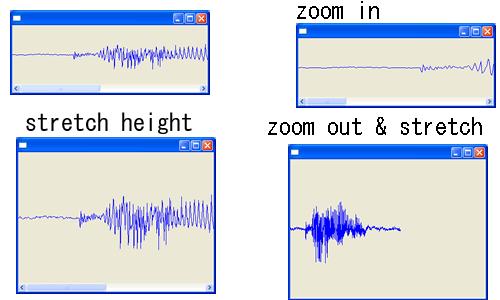
Of course my way is tricky.
But I don't know how to set different scale both width and height.
please see code anyway,it's difficult to explain how to do that.
In my program,I use ScaledPane and ToolbarLayout.
So It's easy zoom in and zoom out.
but When I wish fix height,I would do something.
In my code,I change my graph figure return 1x1 dimension everytime.
because on scaled changed,height length would be changed.
public Dimension getPreferredSize(int hintW,int hintH){
System.out.println(getParentScale());
if(horizontal){
//return new Dimension(values.length*space,maxValue-minValue);
//return new Dimension(values.length*space,(int)((maxValue-minValue)/getParentScale()));
return new Dimension(values.length*space,1);
}else{
return new Dimension(hintW,hintH);
}
}
Once you do that,it's ToolbarLayout and height would be stretched automatic.
Codes
ScaledToolbarLayoutTest.java
ScaledWavFormGraphTest.java
Tuesday, August 09, 2005
my Ecliipse RCP Application for Windows -akJ OptipngWrapper

There are Optimizing PNG File Application - Optipng
And This is Optipng Wrapper Application.
In this application I didn't use draw2d yet.
It's simple Eclipse RCP Application.
It may work under Windows Platform.
If there were not .exe file.No one use this application.
I don't know how to support other platform.
And more it include command-line exe.
you can download this application from sourceforge.jp
And this is Opensource Application,
and you can see code cvs.sourceforge.jp
but be carefull,I didn't refactoring yet.
Monday, August 08, 2005
Scroll ScrollPane by MouseWheel [Draw2D]
Create class implement SelectionListener and write that.
public class WheelMove implements SelectionListener{
public void widgetSelected(SelectionEvent arg0) {
ScrollBar bar=scrollpane.getHorizontalScrollBar();
int direction=1;//16777218
if(arg0.detail==16777217){
direction=-1;
}
bar.setValue(bar.getValue()+direction*bar.getStepIncrement());
}
public void widgetDefaultSelected(SelectionEvent arg0) {
}
}
and get Real ScrollBar of FigureCanvas and add a addSelectionListener.
FigureCanvas canvas = new FigureCanvas(shell);
canvas.getVerticalBar().addSelectionListener(new WheelMove());
FullCode
http://cvs.sourceforge.jp/cgi-bin/viewcvs.cgi/akjrcp/draw2dexample/src/example/draw2d/NonOpaqueViewPort.java?rev=HEAD&content-type=text/vnd.viewcvs-markup
public class WheelMove implements SelectionListener{
public void widgetSelected(SelectionEvent arg0) {
ScrollBar bar=scrollpane.getHorizontalScrollBar();
int direction=1;//16777218
if(arg0.detail==16777217){
direction=-1;
}
bar.setValue(bar.getValue()+direction*bar.getStepIncrement());
}
public void widgetDefaultSelected(SelectionEvent arg0) {
}
}
and get Real ScrollBar of FigureCanvas and add a addSelectionListener.
FigureCanvas canvas = new FigureCanvas(shell);
canvas.getVerticalBar().addSelectionListener(new WheelMove());
FullCode
http://cvs.sourceforge.jp/cgi-bin/viewcvs.cgi/akjrcp/draw2dexample/src/example/draw2d/NonOpaqueViewPort.java?rev=HEAD&content-type=text/vnd.viewcvs-markup
Change isOpaque() of ScrollPane [Draw2D]
 Finaly,I upload sample codes to cvs.
see here
http://cvs.sourceforge.jp/cgi-bin/viewcvs.cgi/akjrcp/draw2dexample/src/example/draw2d/
I'm sorry,I don't have any way to know other platform results.
So I guess sometime on non-windows platrom it's didn't work correctly.
isOpaque methods of Scrollpane return always true.
but if you don't like it,overwrite it.
public class NoOpaqueScrollPane extends ScrollPane{
public boolean isOpaque(){
return false;
}
}
FullCode
http://cvs.sourceforge.jp/cgi-bin/viewcvs.cgi/akjrcp/draw2dexample/src/example/draw2d/NonOpaqueViewPort.java?rev=HEAD&content-type=text/vnd.viewcvs-markup
Subscribe to:
Posts (Atom)

 Posts
Posts

